News
Microsoft Copilot+ PC Gaming Review: A Serious Rig or Just Hype?

Feb
For the last two years, the Microsoft Copilot+ PC was sold to us as the ultimate productivity machine. These devices were marketed for Artificial Intelligence (AI), for Excel wizards, and for maximizing battery life during long workdays.
But in a confusing pivot this week, Microsoft has decided they are now “serious gaming rigs.”
In a new marketing campaign spotted by Windows Latest, Microsoft is urging gamers to “skip the part-matching headache” of building a Custom PC and instead buy a pre-configured Microsoft Copilot+ PC. They claim these machines are designed to “take gaming performance further” and are the “smart choice” for players.
As an analyst looking at the laptop price and performance metrics in 2026, this claim raises eyebrows across the PC gaming community. Is this a genuine hardware evolution, or just a desperate bid to move inventory?
The Marketing Pivot: From AI Workhorse to Gaming Stallion
The sudden rebranding of the Microsoft Copilot+ PC feels like a strategic shift rather than a technological breakthrough. Initially, the hype surrounding these laptops focused entirely on the Neural Processing Unit (NPU) and its ability to handle local AI tasks.
However, with the gaming market exploding in 2026, Microsoft seems eager to capture a slice of the gaming pie. The question remains: can a laptop designed for low-power AI processing effectively run a beast like GTA VI?
While the marketing suggests these devices are ready for “serious players,” the reality of the hardware suggests a different story. Shifting the narrative from “work” to “play” requires more than just a tagline; it requires raw graphical power that many of these units lack.
The “Don’t Build, Just Buy” Argument
Microsoft’s primary argument targets the “console convert” demographic—people who want to get into PC gaming but are intimidated by thermal paste, motherboard compatibility, and cable management.
The Quote: “If you’d rather skip the part-matching headache, Copilot+ PCs come pre-configured with the latest CPUs, GPUs, and thermal designs tuned for gaming, so you can dive straight into the action.”
This is a classic convenience pitch. And yes, “part-matching” is annoying. However, in the world of PC building, that headache is exactly what guarantees you get what you pay for.
When you buy a pre-configured AI laptop, you are often paying a premium for the form factor and the brand name rather than raw performance. A Custom PC allows you to allocate your budget where it matters most: the graphics card.
Hardware Analysis: NPU vs. GPU Performance
To understand why seasoned gamers are skeptical, we have to look at the architecture. A Microsoft Copilot+ PC is defined by its NPU (Neural Processing Unit). This chip is fantastic for accelerating AI tasks, such as background blur in video calls or generative text creation.
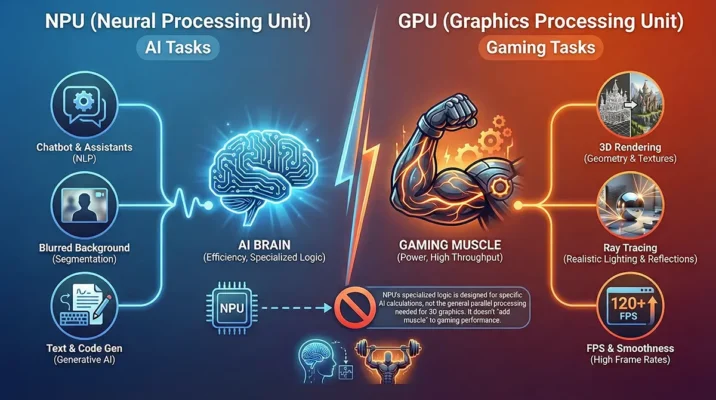
However, gaming does not run on an NPU; it runs on a GPU (Graphics Processing Unit).
- The NPU Role: Handles lightweight AI tasks and efficiency.
- The GPU Role: Renders textures, lighting, and high frame rates.
Many Copilot+ laptops rely on integrated graphics or lower-tier discrete GPUs to maintain their slim profile and battery life. While Microsoft claims these are “tuned for gaming,” they often struggle to compete with traditional gaming laptops equipped with dedicated high-wattage RTX 50-series cards. You are effectively paying for an NPU you might not use while sacrificing the GPU power you desperately need for modern titles.
The ARM Problem: Snapdragon Compatibility
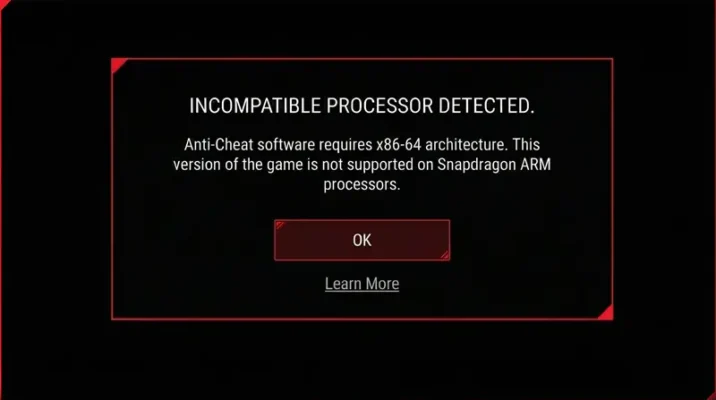
The biggest elephant in the room regarding the Microsoft Copilot+ PC is the processor architecture. Many flagship models utilize Snapdragon (ARM-based) chips rather than the traditional x86 architecture used by Intel and AMD.
1. Anti-Cheat Limitations
While Windows on ARM has improved significantly, compatibility remains a major hurdle. Many popular competitive games utilize kernel-level anti-cheat systems (such as Riot Vanguard for Valorant or Ricochet for Call of Duty) that simply do not function on ARM processors.
2. Emulation Overhead
Games that do run on Snapdragon chips often rely on an emulation layer to translate x86 instructions to ARM. This translation requires processing power, which lowers overall performance. Benchmarks show that while these chips can handle casual titles effortlessly, they struggle to maintain stable frame rates in demanding AAA titles compared to native x86 machines.
Memory Specs: Is 16GB RAM Really Enough?
In their new blog post, Microsoft dropped specific hardware advice that feels surprisingly honest—until you look at the associated costs.
- 16 GB RAM: Microsoft states this is “plenty for most games.”
- 32 GB RAM: They recommend this as “ideal for serious players who run the most demanding titles or use heavy mods.”
In the context of 2026 gaming, 32GB is indeed valid advice. Games are becoming increasingly resource-hungry. However, upgrading a Microsoft Copilot+ PC to 32GB of RAM is not as simple as buying two sticks of RAM for a desktop.
Because these laptops use unified memory soldered onto the motherboard (similar to MacBooks), you must configure the RAM at the point of purchase. Finding a Copilot+ laptop with 32GB of RAM often pushes the laptop price well over $1,500 or $2,000 (approx. 400,000 to 550,000 PKR).
In contrast, a Custom PC builder can buy 32GB of high-speed DDR5 RAM for a fraction of that cost.
Cost Analysis: Copilot+ vs. Custom PC
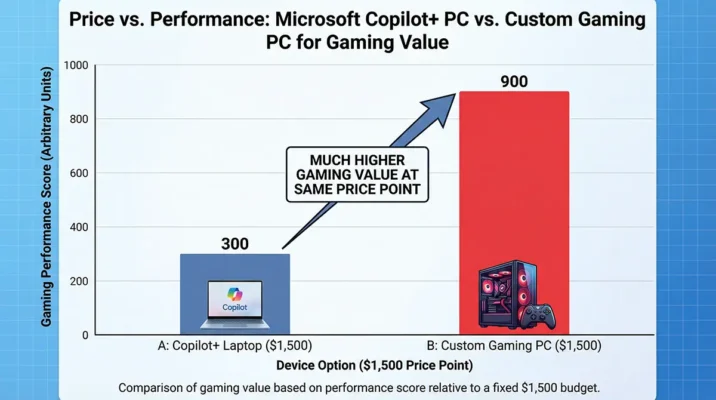
Let’s break down the value proposition. If your goal is strictly PC gaming, how does the math work out?
The Copilot+ Route
- Pros: Slim design, great battery life, AI features, no assembly required.
- Cons: High price-to-performance ratio, potential Snapdragon compatibility issues, non-upgradable components.
- Best For: Casual gamers who prioritize portability and work.
The Custom PC Route
- Pros: Maximum performance per dollar, full upgradability, compatibility with all anti-cheat software.
- Cons: Requires assembly (or paying a builder), higher power consumption.
- Best For: Serious gamers wanting to play GTA VI at 60FPS+.
For the price of a high-end Microsoft Copilot+ PC, you could build a desktop with a superior GPU that outclasses the laptop in every gaming metric.
Verdict: Who Should Buy a Copilot+ PC?
Microsoft is trying to rebrand its “AI Workhorses” as “Gaming Stallions” to move inventory before the next hardware cycle. Their marketing is clever, but it masks the technical limitations of the device.
Buy a Microsoft Copilot+ PC if:
- You are a casual gamer playing titles like Minecraft, Stardew Valley, or older eSports titles.
- You need a laptop primarily for business, AI tasks, and travel, with gaming as a secondary hobby.
- You value battery life over raw graphical fidelity.
Skip the Copilot+ PC if:
- You are a “serious gamer” looking forward to GTA VI.
- You play competitive shooters that require strict anti-cheat compatibility.
- You want the best performance for your money.
Do not let the marketing sway you. If you want a serious gaming rig, do not skip the “part-matching headache.” That headache is the only thing ensuring you get a PC that can actually handle the next generation of games.
Resources
- WindowsLatest: Microsoft says 32GB RAM is ideal for serious gamers on Windows 11, recommends Copilot+ PCs for gaming.
- DigitalTrends: Microsoft says 32GB RAM for gaming beats 64GB splurges.
Frequently Asked Questions (FAQs)
While Microsoft markets Copilot+ PCs as “gaming-ready,” most models rely on integrated graphics or low-power GPUs designed for AI tasks, not high-fidelity gaming. They can handle casual titles like Minecraft or Stardew Valley, but for AAA titles like Cyberpunk 2077 or the upcoming GTA VI, a dedicated gaming laptop or custom PC is far superior.
This is a major limitation. Many popular competitive games, such as Valorant and Call of Duty, use kernel-level anti-cheat systems that are currently incompatible with the ARM architecture found in Snapdragon-based Copilot+ PCs. If you play competitive shooters, check compatibility before buying.
Microsoft claims 16GB is “plenty,” but there is a catch. On these laptops, memory is “unified” (shared between the system and the graphics). This means your games have access to less RAM than on a traditional PC with dedicated VRAM. for “serious” gaming in 2026, 32GB is the safer, albeit much more expensive, choice.
You are paying for the specialized NPU (Neural Processing Unit), the slim form factor, and the brand premium. A traditional gaming laptop or Custom PC prioritizes the GPU, offering significantly better raw gaming performance for the same price (approx. 400,000 PKR).
No. Unlike a desktop Custom PC, the components in a Copilot+ laptop (including the RAM, CPU, and GPU) are soldered onto the motherboard. This lack of upgradability makes “part-matching” beforehand crucial, despite Microsoft’s marketing to “skip the headache.”
Related Blogs

Microsoft Copilot AI Strategy: The End of Physical Libraries?
Microsoft Copilot AI is replacing physical libraries at Redmond. Discover why the tech giant is shifting from books to AI learning and what it means for the future of engineering.
Feb

Google Genie AI: The Shocking End of Traditional Gaming? (2026 Review)
Google Genie AI is transforming the gaming industry. Discover how DeepMind’s new model creates playable worlds from images and the massive copyright risks involved.
Feb

Google Gemini Dominates the New AI Benchmark: Pokémon Blue (2026)
In the ultimate 2026 AI benchmark, Google Gemini crushes OpenAI and Claude at Pokémon Blue. Discover why this gaming victory proves Gemini is the future of Agentic AI.
Jan