

News
WhatsApp Adds Multiple Accounts Support And New Features For iOS

Mar
If you are an iPhone user in Pakistan, you have probably experienced the struggle of carrying two phones just to keep your work and personal lives separate. For years, the inability to run two WhatsApp accounts natively on a single Apple device has been a major pain point. But the wait is finally over! The internet is buzzing as whatsapp adds multiple accounts support and new features for ios, completely changing the messaging game for the Apple ecosystem in 2026.
This monumental update isn’t just about dual accounts, though. Meta has packed this release with powerful artificial intelligence (AI) tools, advanced storage management to save your precious iPhone space, seamless cross-platform chat transfers, and predictive sticker suggestions. Whether you are a busy freelancer in Lahore juggling client numbers or a student in Karachi trying to manage university groups, this update is designed to make your life easier. In this comprehensive guide, we will break down every new feature, explain how you can use them, and explore why this update is a massive win for tech-oriented Pakistanis. Let’s dive in.
The End of the Two-Phone Hustle: Dual Accounts on iPhone
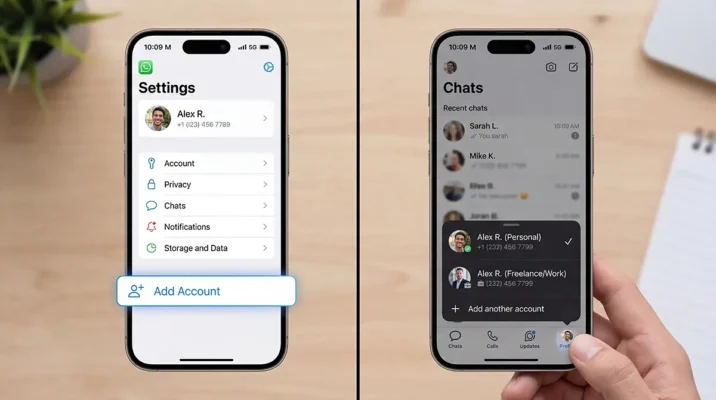
For the longest time, Android users have enjoyed the privilege of running dual apps, while iPhone users had to rely on cumbersome workarounds like using WhatsApp Business for their second number. The latest WhatsApp iOS multiple accounts update finally breaks this barrier, allowing you to seamlessly log into two separate WhatsApp accounts on the exact same app.
How to Manage Two Accounts on iOS
Setting up your second account is incredibly straightforward. Simply navigate to your WhatsApp Settings, and you will notice a new option to add a secondary account right next to your profile name. Once logged in, switching between your two profiles is as easy as tapping your profile picture, which is now conveniently located in the bottom navigation tab. WhatsApp has designed this feature with clarity in mind—notifications will explicitly show which account is receiving a message, ensuring you never accidentally send a casual meme to your boss.
Why This is a Game-Changer for Professionals in Pakistan
In Pakistan’s booming gig economy, managing a professional presence is critical. Freelancers, digital marketers, and small business owners often need a dedicated Dual WhatsApp on iPhone Pakistan setup to communicate with international clients without compromising their personal numbers.
Unique Insight: Apple’s strict sandboxing rules traditionally prevented app cloning, which is why we never had a “Dual Messenger” feature like Samsung or Xiaomi devices. WhatsApp building this multi-account framework natively within their iOS app is a technical marvel and sets a new precedent for other communication apps on the App Store.
Declutter Your iPhone: Advanced Storage Management

Let’s face it: iPhones are an expensive investment in Pakistan, and many users opt for the base storage models (like 128GB) to save costs. Combine that with the endless stream of “Good Morning” forwarded videos from family groups, and your iPhone’s storage fills up faster than you can blink.
Deleting Large Files Without Losing Chat History
Before this update, clearing out WhatsApp media often meant deleting entire chat histories or tediously scrolling through months of messages to find large videos. Now, WhatsApp has introduced a brilliant WhatsApp storage space saver tool.
By tapping on a chat’s name and navigating to “Manage Storage,” users can instantly view files sorted by size. You can now bulk-select and delete heavy video and image uploads specific to that individual conversation while keeping your precious text history entirely intact.
The Ultimate WhatsApp Storage Space Saver
This means you no longer have to sacrifice the sentimental text messages from your friends just to clear WhatsApp storage iPhone. You can simply strip out the bulky media files, instantly freeing up gigabytes of space. For Pakistani users dealing with limited iCloud storage plans, this native cleanup tool is an absolute lifesaver.
Meta AI Magic: Smarter Chats and Flawless Photo Edits
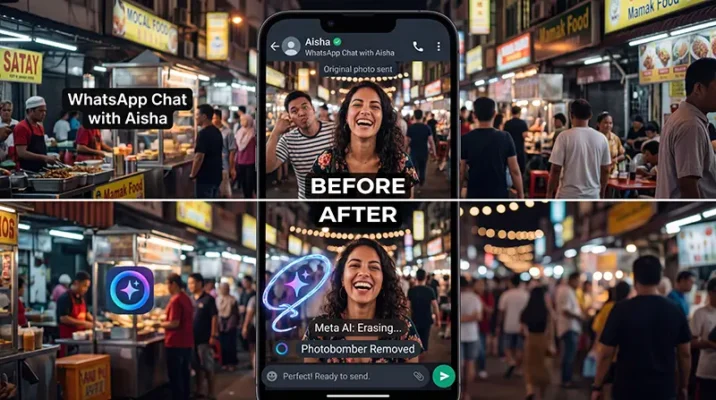
Generative AI is taking over the tech world, and WhatsApp is ensuring its users aren’t left behind. The integration of Meta AI directly into the iOS app brings desktop-level editing and drafting capabilities straight to your fingertips.
Photo Touch-Ups Powered by Meta AI
We have all taken a great photo, only to realize there is a distracting photobomber in the background. With the new Meta AI photo editing WhatsApp feature, you can touch up your images right inside the chat window before hitting send. Using advanced AI, you can remove unwanted background objects, swap out the background entirely for something fun, or apply creative artistic styles. It eliminates the need for third-party photo editing apps, saving both time and device memory.
AI Writing Help for Perfect Replies
Ever find yourself staring at a message, unsure of how to respond professionally? The new WhatsApp AI writing help feature is here to rescue you. By analyzing the conversational context of your chat, the AI can draft suggested responses for you. Whether you need to politely decline an invitation or craft a formal reply to a client, the AI helps you find the right words.
Despite these powerful WhatsApp AI features for iPhone, the company has strictly emphasized that your personal messages remain end-to-end encrypted and completely private. The AI operates securely, ensuring your data isn’t compromised.
Cross-Platform Freedom and Bolder Expressions
Apple and Android have historically functioned like walled gardens, making it terrifying for users to switch devices out of fear of losing their data. WhatsApp is tearing down those walls.
Bridging the Apple-Android Divide
The updated process to transfer WhatsApp chats iOS to Android (and vice versa) is smoother than ever. Previously limited or incredibly buggy, the new native transfer tool allows you to securely migrate your entire chat history, including photos, videos, voice notes, and communities, with just a few taps. If you are a Pakistani tech enthusiast who loves switching between the latest iPhone and flagship Android devices, you are no longer held hostage by your chat history.
Smart Sticker Suggestions
If emojis feel a bit too basic for your energetic group chats, you will love the new predictive sticker suggestions. As you type an emoji into the chat bar, WhatsApp will dynamically suggest a corresponding, high-quality sticker. This smart sticker suggestions WhatsApp feature makes it faster to bring bigger, bolder, and more localized expressions into your daily conversations without having to hunt through your sticker library.
Quick Takeaways
If you are short on time, here is a quick summary of the massive 2026 iOS update:
- Dual Accounts: Manage two different phone numbers on a single iPhone app—perfect for separating work and personal life.
- Granular Storage Control: Delete large media files within specific chats without wiping out the text history.
- Meta AI Photo Editing: Remove background objects or alter images directly in the chat window before sending.
- AI-Powered Replies: Get smart, context-aware suggestions for message replies to save time and communicate better.
- Easy OS Migration: Seamlessly and securely transfer your complete chat history from iOS to Android.
- Predictive Stickers: Automatically see relevant sticker suggestions as you type out emojis.
References
- Social Media Today. (2026, March 26). WhatsApp rolls out multiple features to improve chats. Retrieved from Social Media Today.
- Hindustan Times. (2026, March 27). Two accounts, AI & more: How WhatsApp’s latest update changes iPhone messaging experience. Retrieved from Hindustan Times.
- Times of India. (2026, March 26). WhatsApp launches multiple accounts on iPhone, iOS to Android chat transfer and 4 more features: All details. Retrieved from TOI.
- ProPakistani. (2026, March 26). New Feature Roundup: Free Up Space, Multiple Accounts, Cross-Platform Transfer and More. Retrieved from ProPakistani.

WhatsApp Breaks the Wall: Message Other Apps Seamlessly
Discover how the new WhatsApp third-party chats update lets you message users on other apps. Learn about the EU DMA, setup, and what it means for Pakistan.
Mar

WhatsApp Guest Chats: Message Anyone Without the App
Learn how to use the new WhatsApp guest chat beta feature to message anyone securely without the app. Discover how it works, limitations, and what it means for you.
Mar
Frequently Asked Questions (FAQs)
No, you no longer need the Business app! The new WhatsApp iOS multiple accounts update allows you to add a second personal or professional number directly within the standard WhatsApp Messenger app.
Not at all. Meta has confirmed that personal chats remain end-to-end encrypted. The WhatsApp AI writing help functions without breaking the encryption of your private conversations.
It is very intuitive. Once both accounts are linked in your settings, you simply tap your profile picture located in the bottom navigation tab to instantly toggle between them.
Yes! By navigating to a chat’s info page and selecting “Manage Storage,” you can selectively delete heavy videos and photos while keeping your text history perfectly intact.
Yes, the ability to transfer WhatsApp chats iOS to Android is rolling out globally, including for users in Pakistan. You can find this option in your WhatsApp Settings under the “Chats” section.
Conclusion and Share Your Thoughts
The news that whatsapp adds multiple accounts support and new features for ios marks one of the most significant updates in the platform’s history. By addressing long-standing user frustrations—like the inability to run two accounts natively and the pain of managing limited iPhone storage—Meta has made the iOS messaging experience vastly superior. Adding AI-driven photo editing and smart response drafting ensures that WhatsApp remains at the cutting edge of tech innovation in 2026. For users in Pakistan, this update brings a perfect blend of professional utility and personal convenience.
We want to hear from you! Which of these new features are you most excited to try on your iPhone? Are you finally going to ditch that secondary work phone? Let us know in the comments below, and don’t forget to share this article with your friends and family who are still complaining about their iPhone storage!
